Financial Modelling with Excel and AI 2026
About Course
FM 2026 | Financial Modelling with Excel and AI
Stop just using Excel. Start building financial models that decision-makers trust.
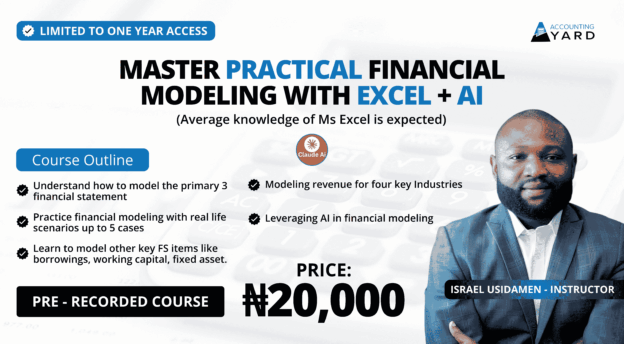
A hands-on masterclass that takes you from Excel user to confident financial modeller. Build a complete, fully integrated three-statement model from a blank workbook using the NairaTank Industries case study, following the FAST Standard (Flexible, Appropriate, Structured, Transparent), and learn to use AI to build, audit and format models faster.
What you will be able to do
✓Build a three-statement model (income statement, balance sheet and cash flow statement) that links, balances and updates when assumptions change.
✓Model revenue the way businesses actually earn it, including subscription, manufacturing, hospitality and logistics examples.
✓Model costs and the balance sheet: cost of sales, SG&A, working capital, inventory, receivables, fixed assets, depreciation, tax and borrowings.
✓Run best, base and worst-case scenarios that you switch with a single dropdown.
✓Present the results in a summary sheet of key numbers and ratios that decision-makers can read at a glance.
✓Use AI (ChatGPT and Claude) responsibly to audit, debug, build and format models and extract data from PDFs, while checking every result yourself.
Your learning journey
1Foundations (Modules 1–2)
What a financial model is, and how to build models you can trust.
2Excel for Modellers (Modules 3–6)
Shortcuts, referencing, custom formats, IF/AND/OR, named ranges, INDEX/MATCH, XLOOKUP, dates, SUMIFS and SUMPRODUCT.
3Modelling Components (Modules 7–12)
Revenue, cost of sales, SG&A, working capital, inventory and receivables, fixed assets and loans.
4The Full Case Study Build (Modules 13–19)
From template and assumptions through scenarios, schedules, tax and statements to the cash flow and final model.
5AI in Financial Modelling (Modules 20–21)
Auditing, debugging, building, data extraction, scenarios and formatting with AI, plus a bonus lesson on management accounts with a Claude skill.
What you get
267 video lessons recorded from live classes, with real participant questions answered
Participant manual, slide decks and Excel workbooks, with starter files and answer keys for the Excel and modelling sessions
Home practice workbooks to sharpen your Excel and modelling skills
21 module quizzes and 3 graded modelling exercises (revenue, SG&A and borrowings), marked against clear criteria
12 months of access to learn at your own pace and revisit any lesson
A certificate when you complete the lessons, pass every quiz and pass the graded exercises
Who this course is for
Before you start: an average working knowledge of Microsoft Excel is expected. Everything else is taught from the ground up.
Try it before you buy
Start with the free course overview and preview lessons, then enrol and build your first professional model.
What Will You Learn?
- Build a fully integrated three-statement model that links and balances
- Model revenue for different industries, including subscription, manufacturing, hospitality and logistics
- Model cost of sales, SG&A, working capital, fixed assets, depreciation, tax and borrowings
- Build best, base and worst-case scenarios switched with a single dropdown
- Apply the FAST Standard so your models are clean, auditable and easy to review
- Use AI (ChatGPT and Claude) to audit, debug, build and format models
Course Content
Module 1: Foundations I – What a Financial Model Is and How It Is Built
What a financial model is, why businesses build them, what each industry relies on and the skills you need.
-
04:53
-
13:21
-
04:03
-
02:42
-
1.5 What Is a Financial Model?
19:10 -
1.6 Q&A Checkpoint: What Is a Financial Model?
15:13 -
1.7 Why We Build Financial Models
12:07 -
1.8 What Each Industry Relies on in a Financial Model
14:11 -
1.9 Q&A Checkpoint: Models Across Industries
02:20 -
1.10 Skills You Need to Build a Financial Model
07:47 -
1.11 How a Financial Model Is Built
07:41 -
1.12 Q&A Checkpoint: Building a Model
02:20 -
1.13 Q&A: Participant Questions on Model Building
12:39 -
Module 1 Quiz: Foundations of Financial Models
Module 2: Foundations II – Building Models You Can Trust
The FAST standard, the dos and don'ts of modelling, auditing a model before you rely on it, and a first look at AI.
-
2.1 Building Models in Line with the FAST Standard
14:32 -
2.2 Q&A Checkpoint: The FAST Standard
03:04 -
2.3 Dos and Don’ts of Building Financial Models
09:08 -
2.4 Q&A: Participant Questions on Good Practice
14:08 -
2.5 Audit Before You Trust the Model
10:19 -
2.6 Demo: The Power of AI in Financial Modelling
08:18 -
2.7 Q&A Checkpoint: Auditing and AI
11:16 -
Module 2 Quiz: Building Models You Can Trust
Module 3: Excel for Modellers I – Shortcuts and Cell Referencing
The keyboard shortcuts and relative, absolute and mixed referencing every modeller relies on.
-
3.1 Introduction to Excel for Modelling: Shortcuts
10:10 -
3.2 Excel Shortcuts for Modellers – Part 1
05:51 -
3.3 Q&A: Excel Shortcuts – Part 1
01:26 -
3.4 Excel Shortcuts for Modellers – Part 2
05:29 -
3.5 Q&A: Excel Shortcuts – Part 2
02:52 -
3.6 Excel Shortcuts for Modellers – Part 3
05:00 -
3.7 Q&A: Excel Shortcuts – Part 3
03:18 -
3.8 Cell Referencing in Excel
06:51 -
3.9 Q&A: Cell Referencing
07:57 -
3.10 Applying Relative and Absolute References
07:08 -
3.11 Mixed Referencing
04:43 -
3.12 Q&A: Mixed Referencing
12:20 -
Module 3 Quiz: Shortcuts and Cell Referencing
Module 4: Excel for Modellers II – Custom Formats and IF, AND, OR Logic
Professional number formats and the logic functions that let models make decisions.
-
4.1 Custom Number Formats – Part 1
10:34 -
4.2 Q&A: Custom Number Formats – Part 1
07:36 -
4.3 Custom Number Formats – Part 2
06:09 -
4.4 Q&A: Custom Number Formats – Part 2
21:13 -
4.5 Custom Number Formats – Part 3
06:57 -
4.6 Q&A: Custom Number Formats – Part 3
01:34 -
4.7 IF, AND and OR Functions – Part 1
07:12 -
4.8 IF and AND Functions – Part 2
08:18 -
4.9 Q&A: IF, AND and OR Functions – Part 1
03:10 -
4.10 Q&A: IF and AND Functions – Part 2
08:37 -
4.11 Session Wrap-Up and What’s Next
03:02 -
Module 4 Quiz: Custom Formats and Logic Functions
Module 5: Excel for Modellers III – Cell Styles, Named Ranges and Scenario Switches
Formatting standards, named ranges and building scenario switches with data validation and lookups.
-
5.1 Cell Styles for Professional Models – Part 1
08:14 -
5.2 Cell Styles for Professional Models – Part 2
09:03 -
5.3 Q&A: Cell Styles – Part 1
02:29 -
5.4 Q&A: Cell Styles – Part 2
09:50 -
5.5 Using Named Ranges
05:02 -
5.6 Q&A: Named Ranges
05:47 -
5.7 Scenario Switches with a Data Validation List
03:29 -
5.8 Q&A: Scenarios with Data Validation
09:31 -
5.9 Scenarios with INDEX and MATCH – Part 1
09:48 -
5.10 Q&A: Scenarios with INDEX and MATCH – Part 1
10:12 -
5.11 Applying Scenarios with INDEX and MATCH
03:21 -
5.12 Q&A: Applying Scenarios with INDEX and MATCH
09:02 -
5.13 Q&A: Scenarios with XLOOKUP
01:52 -
5.14 Scenarios with VLOOKUP
01:10 -
5.15 Revenue Scenarios Using Growth Rate Cases
04:07 -
5.16 Q&A: Growth Rate Scenarios
26:12 -
Module 5 Quiz: Styles, Named Ranges and Scenario Switches
Module 6: Excel for Modellers IV – Date Functions, SUMIFS and SUMPRODUCT
Building model timelines with date functions, plus combo boxes, SUMIFS and SUMPRODUCT.
-
6.1 Introduction to Date Functions
04:19 -
6.2 Q&A: Date Functions
05:02 -
6.3 The EOMONTH Function – Part 1
03:51 -
6.4 Q&A: The EOMONTH Function
04:45 -
6.5 The EOMONTH Function – Part 2
01:50 -
6.6 IF and OR Functions in Models
12:00 -
6.7 INDEX and MATCH Recap
03:20 -
6.8 Q&A: INDEX and MATCH Recap
05:16 -
6.9 Combo Boxes from the Developer Tab
07:08 -
6.10 Introduction to SUMIFS
05:42 -
6.11 Q&A: SUMIFS
07:21 -
6.12 Introduction to SUMPRODUCT
03:08 -
6.13 Q&A: SUMPRODUCT
15:02 -
6.14 Session Wrap-Up and What’s Next
01:26 -
Module 6 Quiz: Dates, SUMIFS and SUMPRODUCT
Module 7: Modelling Components I – Data, Assumptions and Revenue
Sourcing data, researching with AI, setting up assumptions and modelling revenue (Netflix and manufacturing).
-
7.1 Introduction to Modelling Components
03:50 -
7.2 Scope of the Session
00:10 -
7.3 Scope of the Modelling Components Module
01:30 -
7.4 Data Sourcing for Financial Models
18:29 -
7.5 Q&A: Data Sourcing
05:14 -
7.6 Using AI to Research a Business for Your Model
21:11 -
7.7 Introduction to the Assumption Sheet
04:35 -
7.8 Q&A Checkpoint: Data and Assumptions – Part 1
11:02 -
7.9 Q&A: Data and Assumptions – Part 2
04:22 -
7.10 Modelling Revenue – Part 1
17:00 -
7.11 Case Example: Modelling Revenue for Netflix
11:54 -
7.12 Modelling Revenue for a Manufacturer – Part 1
13:14 -
7.13 Q&A: Manufacturing Revenue – Part 1
02:39 -
7.14 Modelling Revenue for a Manufacturer – Part 2
07:55 -
7.15 Q&A: Manufacturing Revenue – Part 2
23:52 -
7.16 Q&A: Manufacturing Revenue – Part 3
20:39 -
7.17 Graded Exercise: Build a Revenue Model (TwinPlant Manufacturing)
-
Module 7 Quiz: Data, Assumptions and Revenue
Module 8: Modelling Components II – Revenue by Industry, Cost of Sales and SG&A
Hospitality and logistics revenue, the hockey stick effect, cost of sales and SG&A methods.
-
8.1 Recap: Manufacturing Revenue
05:22 -
8.2 Sales Mix and Modelling a Hospitality Business
09:41 -
8.3 Modelling Hospitality Revenue – Part 1
25:19 -
8.4 Q&A: Hospitality Revenue
39:15 -
8.5 Modelling Hospitality Revenue – Part 2
01:31 -
8.6 Modelling Revenue for a Logistics Business
10:35 -
8.7 Q&A: Logistics Revenue
12:15 -
8.8 The Revenue Hockey Stick Effect
09:44 -
8.9 Modelling Cost of Sales
07:24 -
8.10 Modelling SG&A: Different Methods
07:21 -
8.11 Knowledge Check: SG&A
02:15 -
8.12 Practice: Modelling SG&A – Part 1
04:44 -
8.13 Practice: Modelling SG&A – Part 2
03:21 -
8.14 Practice: SG&A and the Pareto Principle – Part 3
12:11 -
8.15 Practice: Modelling SG&A – Part 4
07:32 -
8.16 Modelling SG&A: The Driver Approach
11:32 -
8.17 Q&A: The Driver Approach to SG&A
08:31 -
8.18 Graded Exercise: Build an SG&A Model (Helios Industries)
-
Module 8 Quiz: Revenue, Cost of Sales and SG&A
Module 9: Modelling Components III – Working Capital
Modelling receivables, inventory and payables using working capital days and collection patterns.
-
9.1 Introduction to Working Capital Modelling
05:53 -
9.2 Q&A: Working Capital and SG&A
09:03 -
9.3 Calculating Working Capital Days
02:18 -
9.4 Q&A: Working Capital Calculations
01:44 -
9.5 Waterfall Collections in Trade Receivables
05:03 -
9.6 Q&A: Day Counts and Leap Years
13:12 -
9.7 Practice: Working Capital Using WC Days
05:09 -
9.8 Q&A: Working Capital Days
03:59 -
9.9 Session Wrap-Up and What’s Next
06:20 -
Module 9 Quiz: Working Capital
Module 10: Modelling Components IV – Inventory and Trade Receivables Schedules
Movement schedules for the balance sheet, applied to inventory and trade receivables.
-
10.1 Movement Schedules for Balance Sheet Modelling
05:30 -
10.2 Modelling the Inventory Movement Schedule
12:03 -
10.3 Q&A: Inventory Movement Schedule – Part 1
15:14 -
10.4 Q&A: Inventory Movement Schedule – Part 2
05:33 -
10.5 Modelling the Trade Receivables Movement Schedule – Part 1
09:46 -
10.6 Q&A: Trade Receivables – Part 1
22:22 -
10.7 Q&A: Trade Receivables – Part 2
10:43 -
10.8 Q&A: Trade Receivables – Part 3
02:05 -
10.9 Modelling the Trade Receivables Movement Schedule – Part 2
02:24 -
Module 10 Quiz: Inventory and Receivables Schedules
Module 11: Modelling Components V – Fixed Assets, Depreciation and NBV
Modelling fixed asset additions, depreciation, accumulated depreciation and net book value.
-
11.1 Fixed Asset Modelling – Part 1
04:05 -
11.2 Fixed Asset Modelling – Part 2
05:52 -
11.3 Fixed Asset Modelling – Part 3
02:28 -
11.4 Modelling Fixed Asset Acquisitions
03:35 -
11.5 Q&A: Fixed Asset Modelling
08:52 -
11.6 Modelling Depreciation
19:12 -
11.7 Q&A: Modelling Depreciation – Part 1
07:12 -
11.8 Q&A: Modelling Depreciation – Part 2
11:22 -
11.9 Accumulated Depreciation and Net Book Value
19:36 -
11.10 Q&A: Modelling Depreciation – Part 3
14:26 -
11.11 Recap: Accumulated Depreciation and NBV
01:52 -
Module 11 Quiz: Fixed Assets, Depreciation and NBV
Module 12: Modelling Components VI – Loans and Borrowings
Drawdowns, repayments, interest and accruals, and how components flow into the statements.
-
12.1 Introduction to Modelling Loans
05:26 -
12.2 Q&A: Introduction to Modelling Loans
04:12 -
12.3 Modelling a Loan Facility
32:39 -
12.4 Q&A: Modelling a Loan Facility
13:10 -
12.5 Introduction to Modelling Borrowings
05:15 -
12.6 Q&A: Introduction to Modelling Borrowings
06:54 -
12.7 Modelling Drawdowns and Principal Repayments
14:20 -
12.8 Q&A: Drawdowns and Principal Repayments
07:19 -
12.9 Modelling Principal Repayments
03:45 -
12.10 Modelling Interest Charges, Payments and Accruals
06:02 -
12.11 Q&A: Interest Charges and Payments
11:16 -
12.12 Summary: How Modelling Components Flow into the Financial Statements
04:11 -
12.13 Graded Exercise: Build a Borrowing Model (Ridgeline Foods)
-
Module 12 Quiz: Loans and Borrowings
Module 13: Case Study I – Setting Up the Model, Template and Assumptions
Henderson Manufacturing case study setup: cover page, template, table of contents and the assumption sheet.
-
13.1 Introduction to the NairaTank Industries Case Study
04:46 -
13.2 Creating the Model Cover Page
05:15 -
13.3 Q&A: Case Study Information
03:36 -
13.4 Creating the Template Sheet
12:45 -
13.5 Q&A: The Template Sheet
03:06 -
13.6 Creating the Table of Contents
07:23 -
13.7 Q&A: Table of Contents and Duplicating Templates
14:01 -
13.8 Adding Hyperlinks to the Table of Contents
03:45 -
13.9 Q&A: Table of Contents
04:43 -
13.10 Assumption Sheet: General Section
11:10 -
13.11 Q&A: General Assumptions
04:47 -
13.12 Assumption Sheet: Revenue Assumptions
08:41 -
13.13 Session Wrap-Up
06:31 -
Module 13 Quiz: Case Study Setup and Assumptions
Module 14: Case Study II – Operating and Financing Assumptions
Capacity, utilisation, pricing, cost, SG&A, capex, working capital, tax, debt and equity assumptions.
-
14.1 Recap: The Case Study So Far
03:47 -
14.2 Revenue Assumptions: Plant Capacity
13:02 -
14.3 Revenue Assumptions: Utilisation – Part 1
06:36 -
14.4 Revenue Assumptions: Utilisation – Part 2
07:26 -
14.5 Q&A: Utilisation Assumptions
06:57 -
14.6 Revenue Assumptions: Sales Price
07:31 -
14.7 Q&A: Sales Price Assumptions
04:10 -
14.8 Cost of Sales Assumptions
10:49 -
14.9 Q&A: Cost of Sales Assumptions
03:20 -
14.10 SG&A Assumptions
02:34 -
14.11 Q&A: Capex and Depreciation Assumptions
06:18 -
14.12 Q&A: Working Capital Assumptions
06:25 -
14.13 Income Tax Liability Assumptions
01:45 -
14.14 Debt Assumptions
06:53 -
14.15 Q&A: Debt Assumptions
02:00 -
14.16 Equity Assumptions
04:09 -
14.17 Q&A: General Assumptions Review
03:23 -
Module 14 Quiz: Operating and Financing Assumptions
Module 15: Case Study III – Building Scenarios
Inflation, sales price growth and utilisation scenarios driven by a combo box switch.
-
15.1 Introduction to Scenarios
10:35 -
15.2 Q&A: Introduction to Scenarios
06:10 -
15.3 Building an Inflation Scenario
06:14 -
15.4 Q&A: Inflation Scenario
03:55 -
15.5 Q&A: Scenarios with a Developer Combo Box
04:10 -
15.6 Building a Sales Price Growth Scenario
10:02 -
15.7 Q&A: Sales Price Growth Scenario
03:08 -
15.8 Building a Plant Utilisation Scenario – Part 1
14:14 -
15.9 Building a Plant Utilisation Scenario – Part 2
06:04 -
15.10 Q&A: Plant Utilisation Scenario
07:34 -
Module 15 Quiz: Building Scenarios
Module 16: Case Study IV – Schedules, Working Capital and Statement Templates
Revenue, cost, SG&A and working capital schedules, statement templates and ratios.
-
16.1 Recap: Assumptions and Scenarios
02:05 -
16.2 Creating the Scenario Combo Box and Cases
18:56 -
16.3 Participant Demo: Inflation Scenario
08:32 -
16.4 Goals for This Session
02:11 -
16.5 Q&A: Revenue Schedule
06:35 -
16.6 Q&A: Cost of Sales Schedule
05:54 -
16.7 Building the SG&A Schedule
03:08 -
16.8 Q&A: SG&A Schedule
02:40 -
16.9 Building the Working Capital Schedule
04:54 -
16.10 Q&A: Working Capital Schedule
09:01 -
16.11 Calculating Changes in Working Capital
05:33 -
16.12 Q&A: Changes in Working Capital – Part 1
10:59 -
16.13 Q&A: Changes in Working Capital – Part 2
04:19 -
16.14 Setting Up the Financial Statement Templates
05:29 -
16.15 Income Statement Ratios
05:58 -
16.16 Q&A: Income Statement Ratios
02:19 -
16.17 Formula-Driven Balance Sheet Edits
05:25 -
16.18 Formatting a Formula-Driven Cash Flow Statement
07:42 -
16.19 Session Wrap-Up
02:25 -
Module 16 Quiz: Schedules and Statement Templates
Module 17: Case Study V – Equity, Tax and Borrowings
Share capital, retained earnings, income tax liability and borrowings calculations.
-
17.1 Recap and Creating a Worksheet Map
09:02 -
17.2 Calculating Share Capital
04:25 -
17.3 Q&A: Share Capital
06:17 -
17.4 Calculating Retained Earnings
09:57 -
17.5 Q&A: Retained Earnings and Share Capital
11:03 -
17.6 Calculating the Income Tax Liability
08:18 -
17.7 Q&A: Income Tax Liability
02:57 -
17.8 Calculating Borrowings – Part 1
09:50 -
17.9 Calculating Borrowings – Part 2
07:58 -
17.10 Q&A: Borrowings
05:02 -
Module 17 Quiz: Equity, Tax and Borrowings
Module 18: Case Study VI – Fixed Assets, Deferred Tax and the Income Statement
Fixed assets and depreciation, deferred tax, freight costs and populating the income statement and SOFP.
-
18.1 Fixed Asset Calculations: Introduction
04:24 -
18.2 Q&A: Fixed Asset Calculations – Part 1
04:00 -
18.3 Fixed Assets: Introduction to Depreciation
11:12 -
18.4 Q&A: Fixed Asset Calculations – Part 2
07:24 -
18.5 Calculating Fixed Asset Depreciation
07:09 -
18.6 Q&A: Fixed Asset Depreciation
07:26 -
18.7 Building the Fixed Asset Movement Schedule
01:20 -
18.8 Q&A: Fixed Asset Movement Schedule
06:18 -
18.9 Calculating Deferred Tax Liability and Deferred Tax Charge
13:18 -
18.10 Calculating Freight and Warehousing Costs
07:32 -
18.11 Creating and Populating the Income Statement
10:49 -
18.12 Q&A: Populating the Income Statement
02:21 -
18.13 Finalising the Income Statement
02:11 -
18.14 Q&A: Creating and Populating the Statement of Financial Position
04:16 -
Module 18 Quiz: Fixed Assets, Deferred Tax and the Income Statement
Module 19: Case Study VII – Cash Flow Statement, Summary Sheet and Final Model
Completing the cash flow statement, troubleshooting errors and building a scenario-driven summary sheet.
-
19.1 Recap and Completing the Balance Sheet: Income Tax Liability
05:00 -
19.2 Preparing the Cash Flow Statement: Operating Activities
08:24 -
19.3 Q&A: Operating Activities
01:56 -
19.4 Preparing the Cash Flow Statement: Investing and Financing Activities
08:04 -
19.5 Q&A: Balancing the Cash Flow and Historical Adjustments
09:48 -
19.6 Finalising the Cash Flow Statement Format
06:52 -
19.7 Q&A: Troubleshooting Cash Flow Errors
23:26 -
19.8 Updating the Scenario Combo Box
05:02 -
19.9 Building the Summary Sheet: Key Numbers – Part 1
05:35 -
19.10 Summary Sheet: Scenarios and Volumes
10:33 -
19.11 Presenting the Financial Statements in Millions
17:06 -
19.12 Summary Sheet: Income Statement Items
04:41 -
19.13 Q&A: Populating the Summary Sheet
01:16 -
19.14 Summary Sheet: Financial Ratios
04:05 -
19.15 Summary Sheet: Balance Sheet Items
10:13 -
19.16 Q&A: The Final Summary Output
16:44 -
19.17 Graded Exercise: Build the NairaTank Integrated Model
-
Module 19 Quiz: Cash Flow and Summary Sheet
Module 20: AI in Financial Modelling I – Auditing, Debugging and Building Models
Using AI to audit, understand, fix, build and debug financial models.
-
20.1 Introduction to AI in Financial Modelling
13:34 -
20.2 Q&A: Scenarios in Financial Models
12:27 -
20.3 The AI Edge in Financial Modelling
13:19 -
20.4 Six Use Cases for AI in Financial Modelling
12:14 -
20.5 Using AI to Audit and Understand a Model
08:39 -
20.6 Fixing Issues Flagged by an AI Model Audit
17:16 -
20.7 How AI Reads an Excel Workbook
07:48 -
20.8 Q&A: Everyday Uses of AI in Modelling
42:26 -
20.9 Building Model Components with AI
10:49 -
20.10 Q&A: AI Models and Their Capabilities
02:46 -
20.11 Debugging a Schedule and Building a Borrowing Schedule with AI
13:31 -
Module 20 Quiz: AI for Auditing, Debugging and Building
Module 21: AI in Financial Modelling II – Data Extraction, Scenarios and Formatting
Extracting data from PDFs, creating summaries and scenarios, and formatting models with ChatGPT and Claude.
-
21.1 Extracting Financial Statement Data from PDFs with AI – Part 1
05:20 -
21.2 Extracting Financial Statement Data from PDFs with AI – Part 2
07:34 -
21.3 Extracting Financial Statement Data from PDFs with AI – Part 3
05:43 -
21.4 Q&A: General AI Use Cases
09:33 -
21.5 Using AI to Create a Model Summary
04:09 -
21.6 Using AI to Create Scenarios
04:55 -
21.7 Formatting a Financial Model with ChatGPT
15:01 -
21.8 Formatting a Financial Model with Claude
06:22 -
21.9 Reviewing Claude’s Formatting Output
04:28 -
21.10 Bonus: Building Management Accounts with a Claude Skill
01:01:44 -
Module 21 Quiz: AI for Data, Scenarios and Formatting
Module 22: Final Assessment and Certification
Complete the final test to earn your Accounting Yard certificate.
-
Final Test: Financial Modelling with Excel and AI
Student Ratings & Reviews