Financial Modelling with Excel and AI
Categories: Excel, Financial Modelling
About Course
The FM 2026 | Financial Modelling masterclass is a high-intensity, “hands-on” programme designed to move you from just using Excel to building professional, decision-grade financial models. This isn’t a lecture where you just sit and look; it is a practical “engine room” experience where you turn business assumptions into fully integrated three-statement models. Using the Henderson Manufacturing case study, you will master the FAST Standard (Flexible, Appropriate, Structured, Transparent) to ensure your work is clean, auditable, and ready for any boardroom or investor
What Will You Learn?
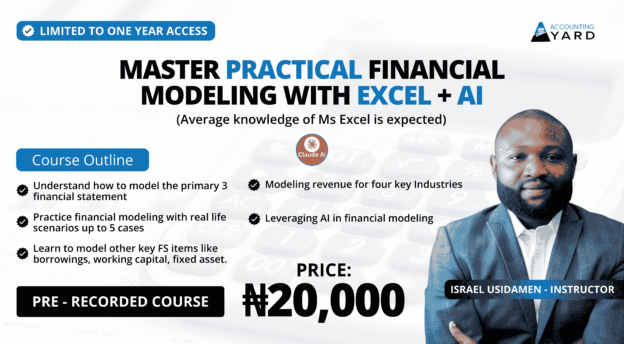
- Modeling revenue for four key Industries.
- Leveraging Al in financial modeling.
- Understand how to model the primary 3 financial statement.
- Practice financial modeling with real life scenarios up to 5 cases.
- Learn to model other key FS items like borrowings, working capital, fixed asset, revenue & operating expense.
Course Content
Foundations of Financial Modelling
-
Introduction to FM training
13:21 -
Q&A for Participants
04:03 -
Objective for Foundation in FM
02:42 -
What is a FM?
19:10 -
Q&A Checkpoint for participants
15:13 -
Why we build financial models
12:07 -
What each Industry leans on in financial models
14:11 -
Q&A Checkpoint for participants
02:20 -
Skillsets needed to build a financial model
07:47 -
How is a model built
07:41 -
Q&A Checkpoint
02:20 -
Q&A from participants
12:39 -
Building model inline with FAST
14:32 -
Q&A Checkpoint for participants
03:04 -
Dos and Donts in build financial models
09:08 -
Q&A from participants
14:08 -
Audit before you trust the model
10:19 -
Demo of AI Power
08:18 -
Q&A Checkpoint for participants
11:16 -
Intro Excel for FM – Shortcuts in Excel
10:10
Excel for Financial Modelling I
-
05:51
-
Q&A for shortcuts part 1
01:26 -
Introduction to shortcuts part 2
05:29 -
Q&A shortcus in Excel part 2
02:52 -
Introduction to shortcuts part 3
05:00 -
Q&A Shortcuts in Excel part 3
03:18 -
Cell referencing in Excel
06:51 -
Q&A Cell referecning
07:57 -
Application of relative and absolute reference
07:08 -
Mixed referencing
04:43 -
Q&A Mixed referecining
12:20 -
Custom format
10:34 -
Q&A Custom format
07:36 -
Custom format part 2
06:09 -
Q&A Custom format part 2
21:13 -
Custom format part 3
06:57 -
Q&A Custom format part 3
01:34 -
IF AND and OR function
07:12 -
IF AND function part 2
08:18 -
Q&A IF AND and OR function
03:10 -
Q&A IF and AND function part 2
08:18 -
Next class
03:02
Excel for Financial Modelling II
-
Introduction to cell style
08:14 -
Intro to cell style part 2
09:03 -
Q&A Cell style
02:29 -
Q&A Cell style part 2
09:50 -
Using Name range
05:02 -
Q&A Using Name range
05:47 -
Scenario Using Data validation list
03:29 -
Q&A Scenario Data validation list
09:31 -
Scenario Index and Match part 1
09:48 -
Q&A Scenario Index and Match part 1
10:12 -
Scanario application using Index and Match
03:21 -
Q&A Scenario application of Index and Match
09:02 -
Q&A Scenario application using Xlookup
01:52 -
Scenario application using Vlookup
01:10 -
Scenario Of Revenue sign Growth rate cases
04:07 -
Q&A Scenario application of Growth rate cases
26:12 -
Introduction to Date Functions
04:19 -
Q&A Intro to Date function
05:02 -
EOMONTH function
03:51 -
Q&A EOMONTH function
04:45 -
EOMONTH function part 2
01:50 -
IF and OR function
12:00 -
Index and Match recap
03:20 -
Q&A Index and Match recap
05:16 -
Combox in develop tab
07:08 -
Intro to SUMIFS
05:42 -
Q&A SUMIFS function
07:21 -
Introduction to SUMPRODUCT function
03:08 -
Q&A SUMPRODUCT
15:02 -
Next class
01:26
Modeling Components I
-
Introduction of modeling components
03:50 -
Scope of the class
00:10 -
Scope of the Modeling Component Class
01:30 -
Data sourcing for financial models
18:29 -
Q&A Data Sourcing
05:14 -
Using AT to research business for FM
21:11 -
Introduction to assumpton sheet
04:35 -
Q&A Check on Data and Assumption
11:02 -
Q&A Data and Assumption part 2
04:22 -
Modeling revenue part 1
17:00 -
Modeling revenue for netflix
11:54 -
Modeling Revenue Manufacturing Illustration
13:14 -
Q&A Modeling Revenue Manufacturing Class illustration
02:39 -
Modeling Revenue Manufacturing Illustration part 2
07:55 -
Q&A modeling revenue Manufacturing illustration part 2
23:52 -
Q&A modeling revenue Manufacturing illustration part 3
20:39
Modeling Components II
-
Revenue manufacturing recap
05:22 -
Revenue Sales mix and Modeling hospitality business
09:41 -
Modeling revenue Hospitality part 1
25:19 -
Q&A modeling hospilaity revenue
39:15 -
Modeling revenue hospitality part 2
01:31 -
Modeling revenue Logistics
10:35 -
Q&A Modeling revenue logistics
12:15 -
Revenue hockey stick effect
09:44 -
Cost of sales modeling
07:24 -
Modeling SG&A different methods
07:21 -
Q&A test your knowledge on SG&A
02:15 -
Practice modeling SG&A part 1
04:44 -
Practice modeling SG&A part 2
03:21 -
Practice modeling SG&A Pareto principle part 3
12:11 -
Practice SG&A Modeling part 4
07:32 -
Modeling SG&A Driver approach
11:32 -
Q&A Driver approach to SG&A modeling
08:31 -
Intro to working capital modeling
05:53 -
Q&A Working capital and SG&A
09:03 -
Working capital days calculation
02:18 -
Q&A Working capital calculation
01:44 -
Waterfall Collection in trade receivables
05:03 -
Q&A Leap years days calculation
13:12 -
Practice working capital calculation using WC days
05:09 -
Q&A on Working capital days calculation
03:59
Modeling Components III
-
Movement schedule for BS Modeling
05:30 -
Inventory Movement Schedule modeling
12:03 -
Q&A Inventory MS modeling
15:14 -
Q&A Inventory MS part 2
05:33 -
Trade receivable movement schedule modeling
09:46 -
Q&A Trade receivable modeling
22:22 -
Q&A trade recivable modeling part 2
10:43 -
Q&A Trade receivable modeling part 3
02:05 -
Trade receivable modeling part 2
02:24 -
Fixed asset modeling
04:05 -
Fixed asset modeling part 2
05:52 -
Fixed asset modeling part 3
02:28 -
Fixed asset modeling acquisition
03:35 -
Q&A Fixed asset modeling
08:52 -
Fixed modeling for depreciation
19:12 -
Q&A Fixed asset modeling of depreciation
07:12 -
Q&A Fixed modeling of depreciation part 2
11:22 -
Fixed asset modeling Accum dep and NBV
19:36 -
Q&A Fixed asset modeling of depreciation part 3
-
Fixed asset Accumulation, depreciation and NBV
01:52 -
Introduction to modeling loans
05:26 -
Q&A Introduction to modeling loans
04:12 -
Modeling loan facility 1
32:39 -
Q&A Modeling loan
13:10
Modeling Components IV
-
Introduction to modeling borrowing
05:15 -
Q&A Introduction to modeling borrowing
06:54 -
Modeling Drawdown and repayment of principal
14:20 -
Q&A On modeling drawdown and principal repayment
07:19 -
Modeling Principal repayment
03:45 -
Interest charge, repayment and interest accrued modeling
06:02 -
Q&A on interest charge and repayment
11:16 -
Modeling compoennets summary using FS
04:11
Case Study I
-
Intro to case study
04:46 -
Creating cover page of the FM
05:15 -
Q&A Case study information
03:36 -
Creating the template sheet
12:45 -
Q&A Creating the template sheet
03:06 -
Creating the Table of Content
07:23 -
Q&A on TOC and Template duplication
14:01 -
Hyperlink for Table of Content
03:45 -
Q&A on TOC
04:43 -
Creating Assumption sheet – General Section
11:10 -
Q&A General assumption section of assumption sheet
04:47 -
Assumpion sheet – Revenue assumptions
08:41 -
Class wrap up for the day
06:31
Case Study II
-
Recap introduction to case study
03:47 -
Revenue assumption plant capacity
13:02 -
Revenue assumption utilisation part 1
06:36 -
Revenue assumptiion utilisation part 2
07:26 -
Q&A Revenue assumptiion utilisation part 2
06:57 -
Revenue Assumption Sales price
07:31 -
Q&A Revenue assumption Sales price
04:10 -
Cost of Sales Assumption
10:49 -
Q&A Cost of Sales Assumption
03:20 -
SG&A Assumption
02:34 -
Q&A Capex and Depreciation assumption
06:18 -
Q&A working capital
06:25 -
Debt Assumptions
06:53 -
Q&A Debt assumptions
02:00 -
Equity Assumption
04:09 -
Q&A General Assumption
03:23 -
Introduction to Scenarios
10:35 -
Q&A Introduction to Scenario
06:10 -
Scenario for Inflation
06:14 -
Q&A Scenario for inflation
03:55 -
Q&A Scenario creating with Combo box Developer
04:10 -
Scenario for Sales price growth
10:02 -
Q&A Scenario Sale price growth
03:08 -
Scenario for Utilization
14:14
Case Study III
-
REcap of Assumption and Scenario from last class
02:05 -
Creating Scenario Combo box and cases
18:56 -
Scenario for inflation participant demo
08:32 -
Goal for the day
02:11 -
Q&A Revenue schedule
06:35 -
Q&A Cost of sales Schedule
05:54 -
SG&A Schedule creation
03:08 -
Q&A SG&A schedule
02:40 -
Working capital schedyle creation
04:54 -
Q&A Working capital schedule
09:01 -
Changes in working capital calculation
05:33 -
Q&A Chnages in working capital
10:59 -
Q&A Changes in WC part 2
04:19 -
Setting up the template for FS
05:29 -
IS related financial ratios
05:58 -
Q&A Financial ratios for IS
02:19 -
Formula driven edit to BS
05:25 -
Formula drive SOCF formating
07:42 -
Concluing part for Class for today
02:25
Case Study IV
-
Recap on case study and Creating a worksheet MAP
09:02 -
Calculation of share capital
04:25 -
Q&A Calculation of Share capital
06:17 -
Calculation for Retained Earnings
09:57 -
Q&A Retained earnings and share capital
11:03 -
Calculation for Income tax liability
08:18 -
Q&A Income tax liability calculation
02:57 -
Calculation for borrowing
09:50 -
Calculation for Borrowing part 2
07:58 -
Q&A Calculation Borrowing part 2
05:02 -
Calculation Intro for Fixed Asset
04:24
Student Ratings & Reviews

No Review Yet